Disabling and debugging caching
This documentation needs review. See "Help improve this page" in the sidebar.
Disabling caching (render cache, dynamic page cache, Twig cache) during development is useful for seeing changes without clearing the cache.
IMPORTANT NOTE: Accessing the site as an anonymous user still makes use of caching even when local development settings have been enabled. You must be logged in to view your site with caches disabled.
Disable Twig Caching
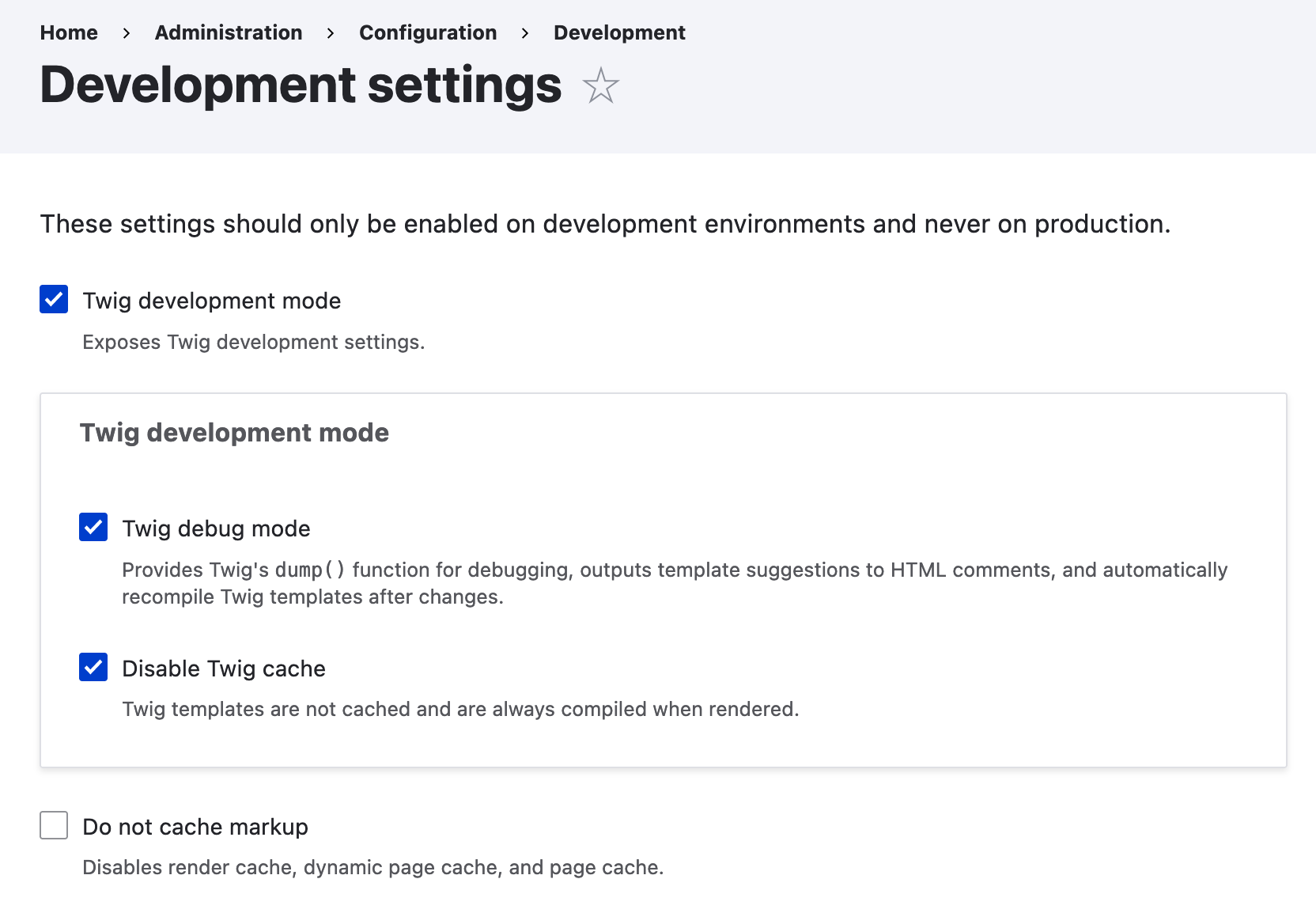
Within Drupal 10.1.0 and later, there is a new "Development settings" page at /admin/config/development/settings that contains Twig development settings, as well as the ability to disable various caches.
The settings are stored as raw key/value, as opposed to configuration (Drupal 10.1.and 10.2 in the state table, see #3437162: Move twig_debug and other development toggles into raw key/value) so the settings cannot be accidentally committed and uploaded to production environments.
The settings available are
- Twig development mode - This checkbox exposes two Twig development checkboxes and checks them by default.
- Twig debug mode - This enables Twig debug, which provides the
dump()function, outputs template suggestions to HTML comments, and will also enables Twig auto-reload, which tells Twig to reload any templates that have been modified by the developer. - Disable Twig cache - This completely disables the Twig cache.
- Twig debug mode - This enables Twig debug, which provides the
- Do not cache markup - This disables the render cache, dynamic page cache, and page cache.
From Twig debugging / caching settings added to administrative user interface. See also Mike Herchel's blog post.
Enabling Twig debugging via Drush
It can also be activated/deactivated with Drush.
Drupal 11 and Drupal 10.3 and above
Enable Twig debug mode (Note: First command drush php:eval is one long line):
drush php:eval "\Drupal::keyValue('development_settings')->setMultiple(['disable_rendered_output_cache_bins' => TRUE, 'twig_debug' => TRUE, 'twig_cache_disable' => TRUE]);"
drush cache:rebuild
Disable Twig debug mode (Note: First command drush php:eval is one long line):
drush php:eval "\Drupal::keyValue('development_settings')->setMultiple(['disable_rendered_output_cache_bins' => FALSE, 'twig_debug' => FALSE, 'twig_cache_disable' => FALSE]);"
drush cache:rebuild
Drupal 10.1 and 10.2
To enable Twig debug mode:
drush state:set twig_debug 1 --input-format=integer && \
drush state:set twig_cache_disable 1 --input-format=integer && \
drush state:set disable_rendered_output_cache_bins 1 --input-format=integer && \
drush cache:rebuild
To disable Twig debug mode:
drush state:set twig_debug 0 --input-format=integer && \
drush state:set twig_cache_disable 0 --input-format=integer && \
drush state:set disable_rendered_output_cache_bins 0 --input-format=integer && \
drush cache:rebuild
See #3437162: Move twig_debug and other development toggles into raw key/value and Development settings toggles moved from state to raw key/value storage for more info about the changes between Drupal 10.2 and Drupal 10.3.
Disable CSS and JS aggregation
Turning off Aggregate CSS and JavaScript files under /admin/config/development/performance can help you find the right files.
The safest method is via the settings.php file, to avoid accidentally committing it:
$config['system.performance']['css']['preprocess'] = FALSE;
$config['system.performance']['js']['preprocess'] = FALSE;
... or disable with Drush, which is the same as via the Performance form:
drush config:set system.performance js.preprocess 0 -y
drush config:set system.performance css.preprocess 0 -y
Enable render cache debugging
The renderer can be configured to add debugging output for each rendered element. This makes it easier to see the cacheability of each rendered element.
You can debug render cache by setting the debug container parameter to true under renderer.config in your services.yml or development.services.yml file:
parameters:
  renderer.config:
    required_cache_contexts: ['languages:language_interface', 'theme', 'user.permissions']
    auto_placeholder_conditions:
      max-age: 0
      contexts: ['session', 'user']
      tags: []
    debug: true
With debugging enabled, each rendered element will be wrapped with HTML comments:
<!-- START RENDERER -->
<!-- CACHE-HIT: No -->
<!-- CACHE TAGS:
   * node:1
   * node_view
   * user:1
   * user_view
-->
<!-- CACHE CONTEXTS:
   * languages:language_interface
   * theme
   * timezone
   * url.site
   * user.permissions
   * user.roles
   * user.roles:anonymous
   * user.roles:authenticated
-->
<!-- CACHE KEYS:
   * entity_view
   * node
   * 1
   * full
-->
Disable Twig cache manually, "the old way"
(This method is not recommended for sites using version 10.3 or newer, because the settings in a services.yml file would take precedence over settings in the admin UI, making it impossible to change debug settings in the browser. )
Load local development settings
Include the local settings file as part of Drupal's settings file.
Copy sites/example.settings.local.php to sites/default/settings.local.php:
$ cp sites/example.settings.local.php sites/default/settings.local.php
Open settings.php file in sites/default and uncomment these lines:
if (file_exists($app_root . '/' . $site_path . '/settings.local.php')) {
  include $app_root . '/' . $site_path . '/settings.local.php';
}
Configure development.services.yml
The development.services.yml file is located under /sites.
Your final development.services.yml should look as follows (mind the indentation):
# Local development services.
#
# To activate this feature, follow the instructions at the top of the
# 'example.settings.local.php' file, which sits next to this file.
parameters:
  http.response.debug_cacheability_headers: true
  twig.config:
    debug: true
    auto_reload: true
    cache: false
services:
  cache.backend.null:
    class: Drupal\Core\Cache\NullBackendFactory
Twig cache: We added a twig.config section in the development.services.yml disabling the cache.
Open settings.local.php and make sure development.services.yml is enabled.
$settings['container_yamls'][] = DRUPAL_ROOT . '/sites/development.services.yml';
Beware of scaffolding
Depending on your composer.json, development.services.yml may be overwritten from during scaffolding. To prevent certain scaffold files from being overwritten every time you run a Composer command you need to specify them one by one in the "extra" section of your project's composer.json. See the docs on Excluding scaffold files.
The following snippet prevents the development.services.yml from being regularly overwritten:
"drupal-scaffold": {
    "locations": {
        "web-root": "web/"
    },
    "file-mapping": {
        "[web-root]/sites/development.services.yml": false
    }
},
Configure settings.local.php
Change the following to be TRUE if you want to work with enabled css- and js-aggregation:
$config['system.performance']['css']['preprocess'] = FALSE;
$config['system.performance']['js']['preprocess'] = FALSE;
Uncomment these lines to disable the Render Cache, disable the Internal Page Cache and disable Dynamic Page Cache:
$settings['cache']['bins']['render'] = 'cache.backend.null';
$settings['cache']['bins']['page'] = 'cache.backend.null';
$settings['cache']['bins']['dynamic_page_cache'] = 'cache.backend.null';
If you do not want to install test modules and themes, set the following to FALSE:
$settings['extension_discovery_scan_tests'] = FALSE;
Rebuild cache
Rebuild the Drupal cache, otherwise your website will encounter an unexpected error on page reload. This can be done with Drush:
drush cache:rebuildOr via the alias:
drush cr... or by visiting the following URL from your website:
https://example.org/core/rebuild.phpOther solutions and tips
Disable Browser cache
After implementing all of the above, are you still clearing the cache to see changes? Browsers do their own caching, which is getting more aggressive, and CSS changes may not be reflected on refresh. Try disabling browser cache:
Open Developer Tools (F12) --> Network --> Disable Cache (toggle).
Tested in Chrome, Firefox and Brave.
Use Mix module
You can install the Mix module, and switch between Dev/Prod mode by toggling the "Enable development mode" checkbox.
Find cache bins
To find all available (but not necessarily enabled) cache bins:
find . -type f -name *.services.yml | \
xargs sed -E -n  's/.*cache\.(.*):.*/\1/p' | \
grep -v "backend\|html.twig" | \
sort -u | \
awk -vORS=\',\' '{ print $1 }' | \
sed "s/,'$//" | sed "s/^/'/"
Note that in OSX you might need to install and run 'gawk' instead of 'awk' in order for the above command to work. You can use brew to install gawk:
brew install gawk
Then you could copy/paste it into your settings.php file and disable caching like this:
$cache_bins = ['bootstrap', 'config', 'data', 'default', 'discovery', 'discovery_migration', 'dynamic_page_cache', 'entity', 'jsonapi_memory', 'jsonapi_normalizations', 'jsonapi_resource_types', 'menu', 'migrate', 'page', 'render', 'rest', 'static', 'toolbar'];
foreach ($cache_bins as $bin) {
  $settings['cache']['bins'][$bin] = 'cache.backend.null';
}
Alternative: develop with caching enabled
Disabling caching has some drawbacks. The whole site responds slower, and rebuilding all caches takes a while too. Doing this a lot, and all those seconds waiting for a response add up. For an approach to developing with the cache enabled, see Drupal 8 development with caching on.
Sendfile Settings
Sometimes local installed environments will have Sendfile enable in their server configuration. Sendfile is used by the server to cache static files, and can greatly improve performance on production environments. However, during development, this can cause CSS and Javascript files to be served from the cache, rather than a fresh copy. You can set Sendfile to off, depending on the environment's web server (Apache or Nginx).
Apache requires an update in the httpd.conf (or sometimes apache.conf)EnableSendfile off
Nginx requires an update in the nginx.confsendfile off
PHP OpCode Caches
Sometimes your latest changes within your PHP files might not be reflected on your webpage due to caches via PHP extensions. One popular PHP code cache is the PHP OpCode extension. Drupal recommends you to enable the PHP OpCode extension for faster code execution. However, it can be sometimes confusing when you want to see the latest changes in your PHP code reflected in your webbrowser or any command line script (e.g. Drush command). So if you are unsure about your code execution during your development process, disabling or configuring the PHP OpCode extension might be a solution. Be aware that the PHP OpCode extension isn't mostly the reason for caches in your development process. Read more about PHP OpCode caches in the following blog article: PHP Performance I: Everything You Need to Know About OpCode Caches.