Configuration API
Configuration API overview
The configuration API in Drupal 8 provides a central place for modules to store configuration data.
The configuration API provides a central place for modules to store configuration data. This data can be simple configuration like your site name, or more complex information managed with configuration entities, such as views and content types.
Configuration is a place to store information that you would want to synchronize from development to production. This information is often created during site-building and is not typically generated by regular users during normal site operation.
You should use the State API, not configuration, for storing local variables that shouldn't travel between instances. Use state for hidden system values, and if you never want to deploy it between environments. You can reset a system, losing all state. Its configuration remains.
The configuration API comes in two flavors - the (simple) Config API and the Configuration Entity API. The key difference is that the Config API is the singleton use case. A singleton is where there can be only a single instance of this configuration. A good example would be the site's name.
The Configuration Entity API should be used to store multiple sets of configuration - for example node types, views, vocabularies, and fields.
Updating the configuration API is vital to avoid fatal errors when updating themes and modules to work in Drupal 8. See Updating themes and updating modules info.
Overview of Configuration (vs. other types of information)
In Drupal 8, there are several types of information:
In Drupal 8, there are several types of information:
Content
Information meant to be displayed on your site, and edited by users: article, basic page, images, files, etc.
Session
Information about individual users' interactions with the site, such as their current selection for a Views exposed filter. This is ephemeral and personalized to a single user.
Information that can change frequently and/or without user intervention. Examples: the time when Cron was last run, whether node access permissions need rebuilding, etc.
Information about your site that is not content and changes infrequently, such as the name of your site, the content types and views you have defined, etc.
Information about your site that is also stored elsewhere. Caches exist only to speed up data retrieval. They never store canonical data.
Read-only information for your site hardcoded within settings.php.
Deciding how to classify your information
It is not always clear how to decide whether a piece of information that your module will store should be classified as content, state, or configuration. Here are some guidelines:
- Configuration vs. State: If your information would need to be deployed from your development server to your live server, it is probably configuration and not state information.
- Configuration vs. Content: Think site builder vs. site editor. If a "site editor" role on the site would want to edit the information, it is probably content. If only a "site builder" role would want to have the power to edit the information, then it is probably configuration. But this is not an absolute rule.
- Configuration vs. Content: Think about numbers. If you have a huge number of items, probably it is content. If you will only ever have a few, probably it is configuration.
- Configuration vs. Content: Configuration tends to define "types of things", such as content types, taxonomy vocabularies, etc. Then each "thing" within the type is a piece of content: a content node, a taxonomy term, etc.
Simple Configuration vs. Configuration Entities
One of the first decisions you'll need to make when using the configuration management system is what type of configuration you are going to store.
Simple configuration is a little easier to implement and is thus ideal for basic configuration settings that result in boolean values, integers or simple strings of text being stored. A good example would be the value of an on/off toggle for a specific feature in your module, or the site name configured by the system module. Simple configuration also encompasses any settings that your module requires in order to operate correctly. For example, JavaScript aggregation has to be either on or off. If it just doesn't exist, the system module won't be able to determine the appropriate course of action. Simple configuration can only depend on the module that provides it. For example, system.site depends on the System module and nothing else.
Configuration entities store information lists of things that users can create and delete; your code will continue to work fine whether there are 0 or 100+. Example: image styles, views, etc. Configuration entities also come with a complete set of CRUD hooks that are fired just like any other entity in Drupal making them an ideal candidate for configuration that may need to be manipulated or responded to by other modules. As an example, Views uses configuration entities allowing for a scenario where at runtime hooks are fired which allow any other module to provide configuration (views) to the Views module. Configuration entities can have dynamic dependencies. Like simple configuration, they depend on the module that provides them. For example, views.view.frontpage depends on the Views module but because it lists nodes it also depends on the Node module. If it's later updated to only show Article nodes, it will also gain a dependency on the Article configuration entity (node.type.article). And so on.In Drupal 8, there are several types of information:
Content
Information meant to be displayed on your site, and edited by users: article, basic page, images, files, etc.
Session
Information about individual users' interactions with the site, such as their current selection for a Views exposed filter. This is ephemeral and personalized to a single user.
Information that can change frequently and/or without user intervention. Examples: the time when Cron was last run, whether node access permissions need rebuilding, etc.
Information about your site that is not content and changes infrequently, such as the name of your site, the content types and views you have defined, etc.
Information about your site that is also stored elsewhere. Caches exist only to speed up data retrieval. They never store canonical data.
Read-only information for your site hardcoded within settings.php.
Deciding how to classify your information
It is not always clear how to decide whether a piece of information that your module will store should be classified as content, state, or configuration. Here are some guidelines:
- Configuration vs. State: If your information would need to be deployed from your development server to your live server, it is probably configuration and not state information.
- Configuration vs. Content: Think site builder vs. site editor. If a "site editor" role on the site would want to edit the information, it is probably content. If only a "site builder" role would want to have the power to edit the information, then it is probably configuration. But this is not an absolute rule.
- Configuration vs. Content: Think about numbers. If you have a huge number of items, probably it is content. If you will only ever have a few, probably it is configuration.
- Configuration vs. Content: Configuration tends to define "types of things", such as content types, taxonomy vocabularies, etc. Then each "thing" within the type is a piece of content: a content node, a taxonomy term, etc.
Simple Configuration vs. Configuration Entities
One of the first decisions you'll need to make when using the configuration management system is what type of configuration you are going to store.
Simple configuration is a little easier to implement and is thus ideal for basic configuration settings that result in boolean values, integers or simple strings of text being stored. A good example would be the value of an on/off toggle for a specific feature in your module, or the site name configured by the system module. Simple configuration also encompasses any settings that your module requires in order to operate correctly. For example, JavaScript aggregation has to be either on or off. If it just doesn't exist, the system module won't be able to determine the appropriate course of action. Simple configuration can only depend on the module that provides it. For example, system.site depends on the System module and nothing else.
Configuration entities store information lists of things that users can create and delete; your code will continue to work fine whether there are 0 or 100+. Example: image styles, views, etc. Configuration entities also come with a complete set of CRUD hooks that are fired just like any other entity in Drupal making them an ideal candidate for configuration that may need to be manipulated or responded to by other modules. As an example, Views uses configuration entities allowing for a scenario where at runtime hooks are fired which allow any other module to provide configuration (views) to the Views module. Configuration entities can have dynamic dependencies. Like simple configuration, they depend on the module that provides them. For example, views.view.frontpage depends on the Views module but because it lists nodes it also depends on the Node module. If it's later updated to only show Article nodes, it will also gain a dependency on the Article configuration entity (node.type.article). And so on.
Configuration Storage
By default, configuration information in Drupal 8 and later is stored in the database.
This documentation needs review. See "Help improve this page" in the sidebar.
By default, configuration information in Drupal 8 and later is stored in the database.
Configuration File Format (YAML)
Extensions (modules, themes, and profiles) provide configuration data in YAML files.
Here is an example of a configuration file:
some_string: 'Woo kittens!'
some_int: 42
some_bool: true
Configuration can also be nested. Here is an example:
name: thumbnail
label: 'Thumbnail (100x100)'
effects:
  1cfec298-8620-4749-b100-ccb6c4500779:
    id: image_scale
    data:
      width: 100
      height: 100
      upscale: true
    weight: 0
    uuid: 1cfec298-8620-4749-b100-ccb6c4500779
Configuration Schema
Configuration has a schema. This is described in the Configuration schema/metadata documentation.
Default Configuration for an extension
An extension (module, theme, or profile) that provides default values for its configuration must put that configuration into YAML files in its config/install sub-directory.
If the extension only needs basic Simple Configuration settings, all of the default configuration could go into one modulename.settings.yml file. For more complex settings, you can separate your configuration into multiple files. Configuration Entities must each be put into their own YAML files, and they should be generated by having the module write out its configuration (don't try writing them by hand).
To provide default values for config that requires a dynamic value (which cannot, therefore, be set in modulename.settings.yml) do so in hook_install(). E.g:
/**
 * Implements hook_install().
 */
function modulename_install() {
  // Set default values for config which require dynamic values.
  \Drupal::configFactory()->getEditable('modulename.settings')
    ->set('default_from_address', \Drupal::config('system.site')->get('mail'))
    ->save();
}
Optional Configuration for an Extension
Optional configuration items for an extension (module or theme) are stored in the config/optional sub-directory.
These are configuration items that depend on something that the extension itself does not explicitly depend on, so they are only installed if all their dependencies are met.
For example, in the scenario that module A has optional configuration which requires module B, but module A is installed first and module B some time later, then module A's config/optional directory will be scanned at that time for newly met dependencies, and the configuration will be installed then. If module B is never installed, the optional configuration item will not be installed either.
Active configuration storage
By default, Drupal 8 stores the active configuration in the database for better performance and scalability. See Default active config changed from file storage to DB storage for more information.
Update configuration from yaml to the database
If during development you need to update configuration from yaml to the database, you can use the drush config-import (cim ) command.
You edit the config yml file in the active config folder (as defined in settings.php e.g sites/default/files/config_6dh1U_2YKLGrrh5oLxAgobbledygook/sync) and then run drush cim. Clear the caches (drush cr) to see the changes.
When you are satisfied with the settings in the yml file you copy them to your module or theme.
Configuration override system
Drupal's configuration system handles configuration in a unified manner. By default, Drupal stores configuration data in the database, but
Drupal's configuration system handles configuration in a unified manner. By default, Drupal stores configuration data in the database, but it can be exported to YAML files, allowing the configuration to be managed by version control and deployed between environments. There are cases however when configuration values need to be overridden for specific purposes. Drupal 7 had the global $conf variable that was usually populated in settings.php with conditional override values for the configuration. A big drawback of that system was that the overrides crept into actual configuration. When a configuration form that contained overridden values was saved, the conditional override got into the actual configuration storage.
Drupal introduces a configuration override system that:
- Maintains these overrides as temporary layers on top of the standard configuration values
- Do not use overridden values for configuration forms
- May store overrides with other configuration files for staging and version control support (for example, in case of language overrides; see below).
The Drupal 7 global $conf variable is renamed to $config in Drupal 8 and is activated on the configuration system by default.
Global overrides
Drupal provides the possibility of using the global $config overrides. The configuration system integrates these override values via the Drupal\Core\Config\ConfigFactory::get() implementation. When you retrieve a value from configuration, the global $config variable gets a chance to change the returned value:
// Get system site maintenance message text. This value may be overriden by
// default from global $config (as well as translations, see below).
$message = \Drupal::config('system.maintenance')->get('message');
To override configuration values in global $config for example in settings.php, reference their configuration keys:
$config['system.maintenance']['message'] = 'Sorry, our site is down now.';
For nested values, use nested array keys
$config['system.performance']['css']['preprocess'] = 0;
When using $config override outside of settings.php, use a preceding global $config;
You may find it helpful to identify the available config variables by either :
- Browsing them using "Configuration Manager" module using the UI found at /admin/config/development/configuration/single/export
- inspecting your sites config yml files directly,
or querying for them with drush.
drush config-list
drush config-get system.performance --include-overridden
Note that values overridden via $config within settings.php will not be viewable from the Drupal administration interface (until #2408549: Display status message on configuration forms when there are overridden values is fixed, until then you can use Configuration Override Warn or Config Override Inspector) or from inspection via drush (unless you add the --include-overridden flag). The administration interface displays the values stored in configuration so that you can stage changes to other environments that don't have the overrides.
For an example of Overriding API Keys for security reasons see: Commerce Gateway Payments API Key Override
Avoiding overrides
You can fetch configuration without overrides to access the raw configuration value (such as to disable applying even the global overrides). This is very useful, for example, if you are writing a configuration form. Using an override-free environment for the form is important, so you can avoid the values creeping into your saved configuration. This is even more useful if your code is used in a multilingual environment, where values of your configuration are routinely overridden as translations.
Here are some examples of getting configuration with and without overrides.
// Get the site name, with overrides.
$site_name = \Drupal::config('system.site')->get('name');

// Get the site name without overrides.
$site_name = \Drupal::config('system.site')->getOriginal('name', FALSE);
// Note that mutable config is always override free.
$site_name = \Drupal::configFactory()->getEditable('system.site')->get('name');
You can also access the config storage directly via the config.storage service which implements StorageInterface::read(). However, this is rarely the correct way to access configuration.
Language overrides
For example, for sending an email to a user, the configuration for that should come in the language of the user, not the page. So remember the language used previously, set the proper language based on the user, do the configuration based operations and set back the language:
// Load the language_manager service
$language_manager = \Drupal::service('language_manager');

// Get the target language object
$langcode = $account->getPreferredLangcode();
$language = $language_manager->getLanguage($langcode);

// Remember original language before this operation.
$original_language = $language_manager->getConfigOverrideLanguage();
// Set the translation target language on the configuration factory.
$language_manager->setConfigOverrideLanguage($language);

$mail_config  = \Drupal::config('user.mail');

// Now send email based on $mail_config which is in the proper language.

// Set the configuration language back.
$language_manager->setConfigOverrideLanguage($original_language);
The language override system also uses configuration storage to store the overrides (unlike global $config based overrides). The language overrides are stored in files named after their base file. So if there is a language-specific override for the above-mentioneduser.mail configuration file, it would be named language.config.$langcode.user.mail. The override files are named with a language.config. prefix, then a language code, and then the original configuration key. Storing the files with regular configuration ensures configuration translations are staged and can be diff'd for changes just like the base configuration.
How do these language override files get created in the first place? Locale module integrates with system events to create translation files for shipped configuration based on the configuration schema information. See #1905152: Integrate config schema with locale, so shipped configuration is translated for background information about that. There is also the core Configuration Translation module which provides an overall user interface to translating configuration based on the schemas. It works for shipped as well as user-created configuration and works with the same language override files.
Providing overrides from modules
It is also possible to provide module level overrides from any module. While Drupal core supports global overrides as well as language-based overrides, there are use cases for many other kinds of overrides, including user role-based, context-based, domain-based, group-based, and so on. Modules can define their own criteria to do these overrides.
When the ConfigFactory collects module provided overrides, it calls any services tagged with config.factory.override:
config_example.services.yml
services:
  config_example.overrider:
    class: Drupal\config_example\Config\ConfigExampleOverrides
    tags:
      - {name: config.factory.override, priority: 5}
Set the subscriber priority to specify the priority of the overrides. Overrides with higher priority will trump those with lower priority (in case of the same config name).
src/Config/ConfigExampleOverrides.php
namespace Drupal\config_example\Config;

use Drupal\Core\Cache\CacheableMetadata;
use Drupal\Core\Config\ConfigFactoryOverrideInterface;
use Drupal\Core\Config\StorageInterface;

/**
 * Example configuration override.
 */
class ConfigExampleOverrides implements ConfigFactoryOverrideInterface {

  /**
   * {@inheritdoc}
   */
  public function loadOverrides($names) {
    $overrides = [];
    if (in_array('system.site', $names)) {
      $overrides['system.site'] = ['name' => 'Overridden site name!'];
    }
    return $overrides;
  }

  /**
   * {@inheritdoc}
   */
  public function getCacheSuffix() {
    return 'ConfigExampleOverrider';
  }

  /**
   * {@inheritdoc}
   */
  public function getCacheableMetadata($name) {
    return new CacheableMetadata();
  }

  /**
   * {@inheritdoc}
   */
  public function createConfigObject($name, $collection = StorageInterface::DEFAULT_COLLECTION) {
    return NULL;
  }

}
Configuration overrides themselves to operate at three distinct layers: language, modules and settings.php, with the last of these taking precedence. Overrides in settings.php take precedence over values provided by modules. Overrides provided by modules take precedence over language. The event subscriber priority for module overrides only sets priority versus the other module overrides, it cannot be used to set higher priority in relation to language or settings.php overrides.
Keep in mind that configuration forms in Drupal Core don't use the overridden values of the configuration. With the module override example above, you will not see "Overridden site name!" at /admin/config/system/site-information.
It is worth reiterating that if you need to read the original configuration values in an override, for example, to compare or merge, you would need to load from the \Drupal::configFactory and not \Drupal::config to avoid a nested loop into your override: -
$original = \Drupal::configFactory()->getEditable('system.site')->getOriginal('name', FALSE);
Even more background information
The overrides system in its latest/current form was added in #2098119: Replace config context system with baked-in locale support and single-event based overrides.
For historical/obsolete information see #1646580: Implement Config Events and Listeners, and storage realms for localized configuration where the configuration override system was originally introduced as well as #1763640: Introduce config context to make original config and different overrides accessible where it was substantially modified to work with contextual access. Language-specific overrides were added later in #2020361: Create LanguageConfigContext to activate configuration overrides based on language.
STILL MISSING FROM THIS DOCUMENTATION
Config overrides + cacheability metadata: #2512718: EntityManager::getTranslationFromContext() should add the content language cache context to the entity+ #2524082: Config overrides should provide cacheability metadata + https://www.drupal.org/node/2532882
Configuration schema/metadata
Drupal 8 includes support for a Kwalify (http://www.kuwata-lab.com/kwalify/) inspired schema/metadata language for configuration YAML files.
This documentation needs review. See "Help improve this page" in the sidebar.
Drupal 8 includes support for a Kwalify inspired schema/metadata language for configuration YAML files. Kwalify itself is written in Ruby and we needed slight adjustments in the format, so not all of the details of Kwalify are directly applicable, but it is pretty close.
Table of contents
- Cheatsheet
- An introductory example
- What are schema files used for?
- Properties
- Types supported in metadata files
- Sequence definitions
- Dynamic type references
- Naming your schema files
- Code style to use for schema files
- PHP API
- Debugging your schema
- Even more background information
Cheatsheet
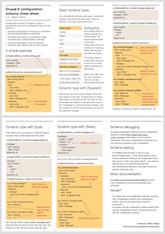
For a quick understanding and some handy examples, see this cheat sheet, then read on if you still have questions:
An introductory example #
System module has two configuration settings related to maintenance mode (whether the site is taken offline for normal visitors):
<?php
$config = \Drupal::config('system.maintenance');
$message = $config->get('message');
$langcode = $config->get('langcode');
?>
(Whether maintenance is actually enabled is stored in the state system and not in configuration.)
The default values for this configuration object are stored in the core/modules/system/config/install/system.maintenance.yml file as:
message: '@site is currently under maintenance. We should be back shortly. Thank you for your patience.'
langcode: en
Each module can have as many configuration objects as needed. All of these are explained in one or more schema files that are shipped with the module. In the system module's case, the files are at core/modules/system/config/schema. The corresponding schema section from the system.schema.yml file is as follows:
system.maintenance:
  type: config_object
  label: 'Maintenance mode'
  mapping:
    message:
      type: text
      label: 'Message to display when in maintenance mode'
The top-level key ("system.maintenance") in the file refers to the base filename of the .yml file ("system.maintenance.yml") and to the name of the configuration object (config('system.maintenance')). The nested levels describe what is in the file. Configuration schema predefines two types of configuration files: config_object for global configuration files and config_entity for entities. The config_object type is defined in core.data_types.schema.yml as follows:
# Root of a configuration object.

_core_config_info:
  type: mapping
  mapping:
    default_config_hash:
      type: string
      label: 'Default configuration hash'

config_object:
  type: mapping
  mapping:
    langcode:
      type: string
      label: 'Language code'
    _core:
      type: _core_config_info
The type mapping is a basic type for key-value pairs. By using the config_object type, the maintenance mode definition reuses the langcode and _core keys and adds one more key for the message itself. Back to the system.maintenance definition, the schema label:'Maintenance mode' describes the content of the schema. Then the actual elements are listed under the mapping key, where the message key is defined, inheriting langcode and _core key from the base type. Each element has a type and a label key which respectively describes the data type and gives a description of the data. The label usually is the same or similar to the configuration form label where the value can be edited by the system administrator.
In all cases supported by core, the top level item in the .yml file will be a mapping with elements described in a mapping list underneath. You should use either of the two specific mapping subtypes config_object or config_entity. The individual elements in the mapping can be of any type based on how you defined the data. The _core key itself and all keys under _core are reserved for Drupal core.
What are schema files used for? #
- The primary use case schema files were introduced for is multilingual support. We need to have a tool to identify all translatable strings in your shipped configuration so when you ship with your own settings as well as default Views, additional user roles, menu items, etc. we can offer those up for translation as part of your module/theme release on https://localize.drupal.org. The nesting levels and types would be enough for this use case.
- We also use schemas to provide actual translation forms for configuration based on your data. This use case is where types gain more importance and labels become crucial. The core Configuration translation module uses schemas to generate translation forms and save translations. The two most important built-in translatable types are 'label' for one-line text input and 'text' for multiline text input.
- Using the knowledge embedded in the configuration schemas about what is stored on a configuration entity, the default persistence implementation for configuration entities requires a configuration schema for the configuration entity, so the right properties are exported with the types defined. Although it is better to provide configuration schemas, if you really don't want, implement the toArray() method in your configuration entity implementation to not require a schema for saving configuration entities of your type.
- A configuration schema is also used to automatically typecast values to their expected types. This ensures that although PHP and web forms in general favor strings over all other types, the right types are used when saving the configuration. That is important so when deploying configuration, only actual changes will show up in the difference, no random type changes.
In PHPUnit, all TestBase derived tests enforce strict configuration schema adherence by default. It will result in schema errors if the schema file is not present or valid. Although not recommended, it can be skipped by setting in your test:
protected $strictConfigSchema = FALSE;
See https://drupal.org/project/config_inspector for a module to help with debugging your schemas. The module helps find missing schemas and schema elements with various views on your data and schema.
There are other ideas for schemas that contributed modules might provide, eg. generating web service interfaces based on some of them. There are most likely other use cases people will find that we did not even think about.
Properties #
- type: The type of the value; can either be a base type or a derived type (see examples below).
- label: User interface label for the value. The label does not have to match a corresponding configuration form label, but matching labels will improve clarity.
- translatable: Whether the defined type is translatable; Note: not all types can be made translatable. To make a
type:stringtranslatable, change it totype:labelinstead of addingtranslatable:true, or it will not show up in translation forms. - nullable: Whether the value can be empty; if not set it defaults to being required.
- class: Only to be used on base types to assign the class implementing parsing (see below for examples on TypedData and configuration system-defined types).
- Type-specific properties:
- mapping: Property on the value of the mapping type, used to list the underlying elements in the mapping. The keys and types of the values in the mapping need to be described in the schema. Only string keys are allowed in mappings.
- sequence: Property on the value of the sequence type, used to define an arbitrary list of defined values. In a sequence, keys are optional and may be integers or strings and are not explicitly mapped. Only the types of values must be defined in the schema.
- deprecated: If this config schema entry is deprecated, this property will have the deprecation message as value. For more details, see Drupal core deprecation policy for config schema.
Types supported in metadata files #
As mentioned above, the most basic types, as well as some interesting complex types, are defined in core.data_types.schema.yml. The basic types are:
- boolean
- integer
- float
- string - used for untranslated strings, such as IDs
- uri
These are mapped to their TypedData API counterparts.
Further types are provided by Drupal core:
- label: short and translatable string
- plural_label: a label that contains plural variants
- text: long and translatable string
- uuid: a string that is a UUID
- path: a string that is a Drupal path
- date_format: a string that is a PHP date format
- color_hex: a string that is a hex color value
- machine_name: a string that is a machine name
- weight: an integer that is meant to hold weight
For complex, non-scalar data, use one of the following:
- mapping - a key-value pair list type ("associative array" or "hash") where each element may have a different type.
- sequence - a simple indexed list ("indexed array") where elements are either of the same type or are based off the same dynamic type name (see below) and the keys are irrelevant. The keys may be strings, or the array may be defined as numeric.
The key difference between sequences and mappings is with sequences you don't know the names of the keys and the number of the keys, while with mappings all the keys are defined explicitly.
For data that cannot be represented by any type:
- undefined - used by the system to assign to elements at any level where configuration schema is not defined
- ignore - use when no data typing is possible
Custom types
Custom types can be defined by defining the class that would map to the type. For example, the mapping type is defined thus:
mapping:
  label: Mapping
  class: '\Drupal\Core\Config\Schema\Mapping'
  definition_class: '\Drupal\Core\TypedData\MapDataDefinition'
All the rest of the types defined in configuration schemas (including system.maintenance itself) simply derive from other types, for example, "label", "path", "text", "date_format", "color_hex" and "machine_name" are all defined as strings. The distinction of these types could help tools parsing the schema to identify textual types for different purposes. Furthermore, each type can add validation constraints that are appropriate for that particular type: UUIDs, machine names and Hex Colors are all strings, but they all look very different.
# Human readable string that must be plain text and editable with a text field.
label:
  type: string
  label: 'Label'
  translatable: true

# Internal Drupal path
path:
  type: string
  label: 'Path'

# Human readable string that can contain multiple lines of text or HTML.
text:
  type: string
  label: 'Text'
  translatable: true

# PHP Date format string that is translatable.
date_format:
  type: string
  label: 'Date format'
  translatable: true
  translation context: 'PHP date format'

# HTML color value.
color_hex:
  type: string
  label: 'Color'

# Machine-readable identifier that can only contain certain characters.
machine_name:
  type: string
  label: 'Machine name'
  constraints:
    Regex: '/^[a-z0-9_]+$/'
    Length:
      # @see \Drupal\Core\Config\Entity\ConfigEntityStorage::MAX_ID_LENGTH
      max: 166
Note that the label, text and date_format types are also marked as translatable. This means the core interface translation module will identify items with these types and translate based on community or admin provided translations from the database, creating translation override files. Note that translatable strings may get context with the translation context key such as shown here for date formats. This way strings like 'Y' will get an additional 'PHP date format' context, so translators know it is not an abbreviation of 'Yes' but a PHP date format for years.
The same way, you can define reusable complex types on top of base types by using the format explained above for maintenance mode:
# Mail text with subject and body parts.
mail:
  type: mapping
  label: 'Mail'
  mapping:
    subject:
      type: label
      label: 'Subject'
    body:
      type: text
      label: 'Body'
This gives you a reusable "mail" type for email text settings where a subject and body are in a mapping list. This is exactly the same as defining schema for a config key, but you picked a name for it that is not an existing config key, so it will not conflict with other schema definitions. Based on this definition "mail" can be used as a type elsewhere (as is used in the user module's email settings schema in user.schema.yml):
user.mail:
 type: config_object
 label: 'Email settings'
 mapping:
  cancel_confirm:
    type: mail
    label: 'Account cancellation confirmation'
  password_reset:
    type: mail
    label: 'Password recovery'
  [....]
Finally, once again the two important complex types for defining configuration files are also defined here in core.data_types.schema.yml:
config_object:
  type: mapping
  mapping:
    langcode:
      type: string
      label: 'Language code'
    _core:
      type: _core_config_info

config_entity:
  type: mapping
  mapping:
    uuid:
      type: string
      label: 'UUID'
    langcode:
      type: string
      label: 'Language code'
    status:
      type: boolean
      label: 'Status'
    dependencies:
      type: config_dependencies
      label: 'Dependencies'
    third_party_settings:
      type: sequence
      label: 'Third party settings'
      sequence:
        type: '[%parent.%parent.%type].third_party.[%key]'
    _core:
      type: _core_config_info
Sequence definitions
In a normal mapping instance, your schema defines the type of data stored by each key. In the case of sequences, the keys are unknown to the schema. There are two common types of sequences used by Drupal modules.
Extending a defined type
In this case, a defined schema already exists and your module is adding its own schema definition. This pattern is commonly used with core modules such as views.
Below is an example that defines a Views access plugin schema for a module:
views.access.domain:
  type: mapping
  label: 'Domains'
  mapping:
    domain:
      type: sequence
      label: 'List of domains'
      orderby: value
      sequence:
        type: string
        label: 'Domain'
The above example supports a configuration such as:
domain:
  - domain_org
  - domain_com
Defining a new schema
In a case where your module adds configuration that uses a sequence, you can define that schema as shown below:
domain.language_negotiation:
  type: config_object
  label: 'Domain language negotiation'
  mapping:
    domain_language:
      type: sequence
      label: 'Domains'
      orderby: key
      sequence:
        type: string
        label: 'Langcode mapping'
The above example supports a configuration such as:
domain_language:
  example_local: en
  one_example_local: af
  two_example_local: af
  three_example_local: en
  four_example_local: en
Orderby key
Sequences can be sorted by specifying an orderby key in the config schema definition. Possible values are: key and value. By default all sequences are still not sorted. This is to preserve backwards-compatibility and not result in unexpected change on configuration save.
It is strongly recommended to add preferred sorting to avoid confusing diffs in configuration and even potential data integrity problems. Drupal core configuration schemas will be updated with default sorting for sequences in a future release. If the value you are storing in the sequence is an associative array the recommended sort is key. If the value is an non-associative array then the recommended sort is value.
If you use orderby: value any keys set will be lost. This behavior is analogous to PHP's sort() function - see https://secure.php.net/manual/en/function.sort.php.
The example of using orderby: value for a non-associative array
views.access.domain:
  type: mapping
  label: 'Domains'
  mapping:
    domain:
      type: sequence
      label: 'List of domains'
      orderby: value
      sequence:
        type: string
        label: 'Domain'
If a user add the domains to the configuration in unsorted form, like this:
- b_domain
- a_domain
- c_domain
Then after saving and exporting the configuration, the domains will be sorted like this:
- a_domain
- b_domain
- c_domain
The example of using orderby: key for an associative array
domain.language_negotiation:
  type: config_object
  label: 'Domain language negotiation'
  mapping:
    domain_language:
      type: sequence
      label: 'Domains'
      orderby: key
      sequence:
        type: string
        label: 'Langcode mapping'
If a user add pairs of domains and codes to the configuration in unsorted form, like this:
- b_domain: be
- a_domain: en
- c_domain: af
Then after saving and exporting the configuration, the pairs will be sorted by keys, like this:
- a_domain: en
- b_domain: be
- c_domain: af
If this associative array is sorted by values (using orderby: value), then the keys will be lost, and the result will be the following:
- af
- be
- en
Dynamic type references #
As shown above, even simple types are essentially references, and complex types like "mail" are routinely used to reference complex types. Sometimes the type of a value is not static and can depend on the data, such as for image styles that can have different effects applied or views, which consists of various plugins. You can reference keys in the data as part of the type name to refer to dynamic types.
Variable values in types should be enclosed in [] (square brackets), and variable values can be combined with known components. There are three types of references possible:
- Element-key reference: such as type: book.[%key] where %key is replaced by the element's key.
- Sub-key reference: such as type: 'views.field.[table]-[field]' where the type is computed based on the value of table and field keys in the nested structure
- Parent-key reference: such as type: 'views.display.[%parent.display_plugin]' where the display_plugin key from the parent is used to figure out the type for the element
There are rich examples of this in image styles and views which use plugins extensively. An example from image styles considering core/modules/image/config/install/image.style.medium.yml that has this YAML data structure:
name: medium
label: 'Medium (220x220)'
effects:
  bddf0d06-42f9-4c75-a700-a33cafa25ea0:
    id: image_scale
    data:
      width: 220
      height: 220
      upscale: true
    weight: 0
    uuid: bddf0d06-42f9-4c75-a700-a33cafa25ea0
langcode: en
Here the structure of the data key depends on the type of the effect, which is specified in the id property of the effect. So the type to be used depends on the data and cannot be specified statically. Differently set up image styles would use different effects. So we need to build in a reference to the type specification. The corresponding schema section from image.schema.yml is as follows:
image.style.*:
  type: config_entity
  label: 'Image style'
  mapping:
    name:
      type: string
    label:
      type: label
      label: 'Label'
    effects:
      type: sequence
      sequence:
        type: mapping
        mapping:
          id:
            type: string
          data:
            type: image.effect.[%parent.id]
          weight:
            type: integer
          uuid:
            type: string
This defines metadata for all image styles (image.style.*) as a mapping of name, label, effects keys. Then effects itself is a sequence (there can be any number of effects), with each item in the list a mapping with details about the effect. The key of the sequence is the uuid of the effect, but that does not matter, sequences don't care about their keys, so we only define the type of elements. Common values for effects are id, data and weight, however, the content of the data depends on the parent's id value (in the above example "image_scale" is the name of the effect used). So when this schema is applied to the data, image.effect.image_scale is the actual type referenced.
Note that you may also encounter a slightly different sequence definition where the type of the sequence items is defined as a strictly one item list. This format is deprecated and will be removed in Drupal 9:
deprecated.sequence.definition.format:
  type: sequence
  sequence:
    - type: string
      label: 'DO NOT COPY, THIS IS DEPRECATED'
Naming your schema files #
Your schema files should have a globally unique name. If your schema file's name is the same as that of another extension, either your file or the other file will not be found, which can result in obscure bugs. Therefore, it is recommended to prefix your schema files with your module's name.
Code style to use for schema files #
Just follow the .yml code style as applicable elsewhere in Drupal core. See the above examples for the approach to follow. Key points:
- Include a top-level comment explaining what is in the file. If you only have one schema file for your whole module, a comment like this suffices:
# Schema for the configuration files of the Contact module. - Avoid comments that provide no extra clarity. Such as "Comment settings" above a section defining schema for comment.settings is superfluous. The schema items should have labels anyway, which should describe them well. Only add comments if necessary.
- Do not use double quotes for strings, use single quotes.
- Use single quotes for label values even if they are one word for consistency.
- Never use quotes for key definitions and types (in Drupal, key names and types are strings by definition and should not have spaces).
- In Drupal, integer values contained YAML config data files are cast to string and therefore are wrapped in single quotes.
- Add labels to at least the values which will need to be translatable (as well as the containers that wrap them). See the configuration inspector tool detailed below in the debugging section to test whether a form can be generated from your schema in a useful way.
- Watch your indentation levels. This is not a code style requirement per se since it is important to use proper indentation in YAML so you get the desired schema structure.
Note: The regular configuration data .yml file style dictates you only use single quotes when more than one word is used because the .yml serialization will do that as a standard practice, so this standard makes diff-ing simpler for changing configuration. See Configuration file coding standards. However, the schema recommendations above differ from that, because schema files are always hand-written and using quotes around label values all the time is better for consistency.
PHP API #
You can retrieve configuration dressed up with the metadata using the \Drupal::service('config.typed') function (such as for the system maintenance mode):
$definition = \Drupal::service('config.typed')->getDefinition('system.maintenance');
The structure of the array will be as follows:
array(5) {
  ["label"]=>
  string(16) "Maintenance mode"
  ["class"]=>
  string(34) "\Drupal\Core\Config\Schema\Mapping"
  ["definition_class"]=>
  string(40) "\Drupal\Core\TypedData\MapDataDefinition"
  ["mapping"]=>
  array(2) {
    ["langcode"]=>
    array(2) {
      ["type"]=>
      string(6) "string"
      ["label"]=>
      string(13) "Language code"
    }
    ["message"]=>
    array(2) {
      ["type"]=>
      string(4) "text"
      ["label"]=>
      string(43) "Message to display when in maintenance mode"
    }
  }
  ["type"]=>
  string(18) "system.maintenance"
}
A more complex example to retrieve the typed data associated with the medium image effect's first effect data as cited above in the parent references section:
// Get typed configuration from under the the image.style.medium config
// key's effects children. Take the uuid key shown above in the example config
// file (corresponding to the first effect in the style) and the data children's elements.
$effects = \Drupal::service('config.typed')->get('image.style.medium')->get('effects.bddf0d06-42f9-4c75-a700-a33cafa25ea0.data')->getDataDefinition();
This will result in an image.effect.image_scale type as explained above, and will return a map definition like:
object(Drupal\Core\TypedData\MapDataDefinition)#1061 (3) {
  ["mainPropertyName":protected]=>
  NULL
  ["propertyDefinitions":protected]=>
  NULL
  ["definition":protected]=>
  array(5) {
    ["type"]=>
    string(24) "image.effect.image_scale"
    ["label"]=>
    string(11) "Image scale"
    ["class"]=>
    string(34) "\Drupal\Core\Config\Schema\Mapping"
    ["definition_class"]=>
    string(40) "\Drupal\Core\TypedData\MapDataDefinition"
    ["mapping"]=>
    array(3) {
      ["width"]=>
      array(2) {
        ["type"]=>
        string(7) "integer"
        ["label"]=>
        string(5) "Width"
      }
      ["height"]=>
      array(2) {
        ["type"]=>
        string(7) "integer"
        ["label"]=>
        string(6) "Height"
      }
      ["upscale"]=>
      array(2) {
        ["type"]=>
        string(7) "boolean"
        ["label"]=>
        string(7) "Upscale"
      }
    }
  }
}
The TypedData API can be fully leveraged on the elements. Such as:
// Get the effects sequence object from the medium image style.
$effects = \Drupal::service('config.typed')->get('image.style.medium')->get('effects');
// $effects represents the sequence keyed by uuids as shown above in the parent reference
// example. Use the getValue() TypedData method to retrieve the value.
$first_uuid = key($effects->getValue());
// Take the data keys for this first effect.
$data = $effects->get($first_uuid)->get('data');
// Examine values and types for width.
$data->get('width')->getPluginId(); // will return 'integer'
$data->get('width')->getValue(); // will return 220
See more code examples around navigating configuration based on the schema as well as form generation based on the schema at https://drupal.org/project/config_inspector
Debugging your schema #
The configuration inspector module provides a user interface to compare schemas with data and see how form generation and translation (when available) would work with the schema when applied to the data. That can be used to find issues in the schema, see https://drupal.org/node/1910624#comment-7088154 for tips on how to use that to debug schemas.
The core Configuration translation module builds an actual user interface on top of the schemas and lets people translate configuration. You can use this module to debug if your configuration is properly translatable and if the translations appear at the right places (on the front end) and not appear at some places (like the back end where people can edit your original configuration).
Even more background information #
Check out #1866610: Introduce Kwalify-inspired schema format for configuration and #1648930: Introduce configuration schema and use for translation for hundreds on top of hundreds of comments where different approaches and solution possibilities were discussed (and even more side issues spawned) before we came to this format. (As well as #1914366: Move all configuration schema files into a schema subdirectory for why they are located where they are). See also #1905152: Integrate config schema with locale, so shipped configuration is translated for information on how the schema system integrates with the locale module. #1952394: Add configuration translation user interface module in core is where the translation module was added.
#1602106: Document default configuration files is a start at documenting the regular configuration yml conventions.
Configuration entity dependencies
Configuration entities may declare dependencies. A dependency can be a module, a theme or an entity.
Creating a configuration entity type
This page provides an example of how to create a configuration entity type, with administration management pages, for Drupal 8. For an
Simple Configuration API
This page describes the API for getting and setting configuration data, for Simple Configuration.
Working with Configuration Forms
Use $config in Form Context